Cozyla Calendar Review: Real Wins, Real Frustrations
Only one person in our house cared about the to-do list sitting on the fridge: me. And I wasn’t having it anymore.
Enter the digitized wall calendar. It promises peace among families. No more yelling, “go pick up your room!” every Saturday or arguments over whose turn it is to take out the trash. The glowing hub tells all.
This was one purchase I didn’t have to twist arms too hard to buy. After our own weighing the pros and cons of what’s on the market, our family settled on the Cozyla+2.
Did the Cozyla bring us the promises of peace and household organization? The truth: sort of.
Ups and downs, we’re still using it, though.
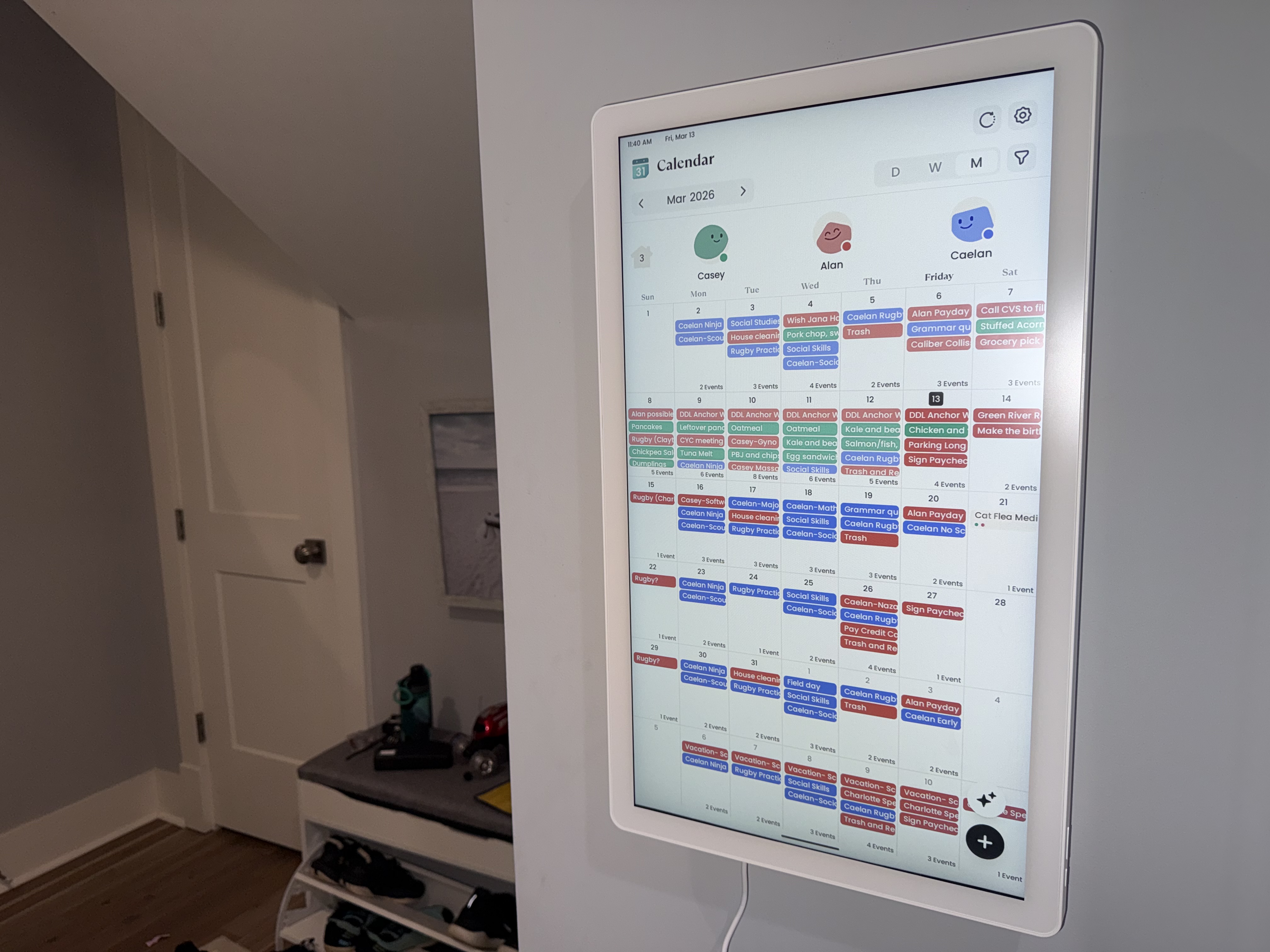
We’ve had the 24″ Cozyla+2 (22.65 x 13.57 x 1.26 in) with the rotating wall mount for three months. Ours is mounted vertically. Because of where it sits, rotating it would mean taking it off the wall first.
The good stuff first.
Installation was the easy part, actually. It came with a drilling template, the wall mount went up easy-peasy, and we were done.
Our house naturally had the perfect space for it: a wall in our mud room, right next to where you enter the main living spaces. This placement helps checking the list before leaving for school or practice become a natural routine.
My son actually checks it off. Himself. Without being told to go do something specific, the conversation has shifted to, “Make sure your morning chores are all checked.” Or: “Is your routine done? Ok, finish and then you can have screen time.” The responsibility sits with him now instead of with me.
In a house where for months he kept saying, “stop telling me what to do!” — but wouldn’t do the tasks without being told — it has been a game-changer.
Allowance and reward tracking? Easier. I can see it. He can see it. We’re not arguing over what was or wasn’t done two Tuesdays ago. The reward system, despite needing more celebration energy, works as a basic framework. The bones of this app are good.
Now for the friction.
Setup is not intuitive. At all. The tutorial videos assume you already understand how the app thinks, which means they’re not really tutorials.
Want to assign a chore to a specific day? I couldn’t do it during setup. The solution looked like waiting until that day arrives on the calendar and configure the chore then. Support confirmed this.
But then, after Cozyla’s response, my husband found an actual workaround to put a chore or routine to a specific day regardless of what day of the week you were programming it. I guess he should work for Cozyla support!
My husband is the one who figured out half the workarounds. I constantly forget what the chore-scheduling work-around is, and end up asking him every time.
There’s no easy way to switch something between a chore and a routine. When I wanted a task that anyone in the family could complete, I didn’t realize I had to select “compete” as the assignment type. That language means nothing to a new user.
Some chores — laundry, for us — can be done any day, as long as they’re done by a certain point in the week. The app doesn’t think that way.
It also keeps sending alerts for chores that have already been finished by someone, like feeding the cat in the evening.
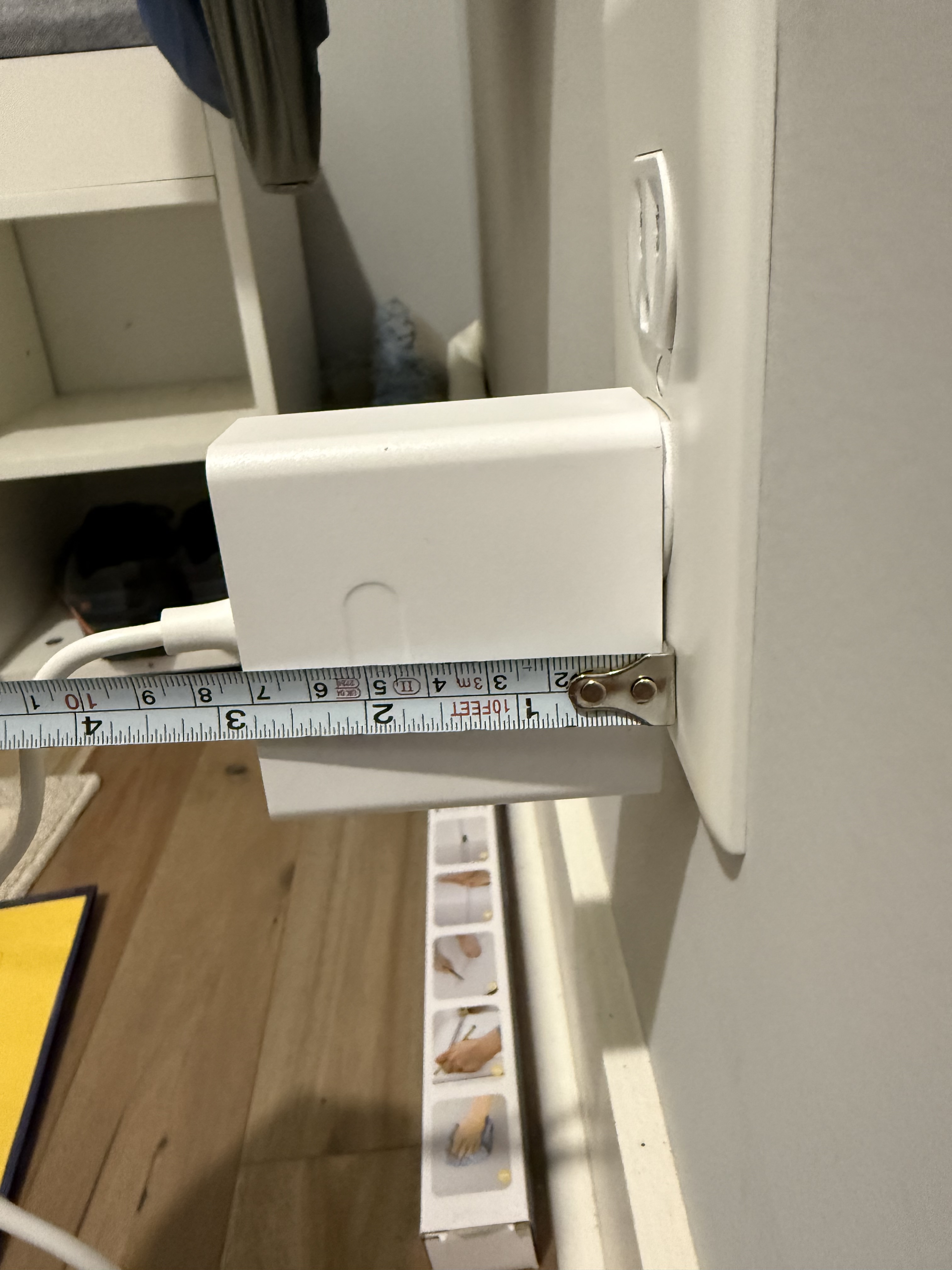
The wall plug is a brick! It gets knocked out of the wall at on accident at least twice a week. Plus, it’s heavy enough to slip out of the outlet on its own.
The shape prevents it from discreetly being plugged in anywhere— not behind furniture, not on a kitchen counter. It’s an awkward piece of hardware for an app marketed to families.
Rewards need more razzle-dazzle.
I don’t get a notification when my son wants to claim a reward. Approving it requires opening the phone app to Rewards → Reward History. That workflow is buried in a way that makes no sense.
And the celebrations when he does complete something? Flat. A noise and a circle of stars. Finishing a routine earns some balloons. For a kid with ADHD, that feedback loop of instant reward is motivational fuel. Some randomized variety would go a long way. Randomize celebrations with fireworks, balloons, a shooting star, or something else entirely.
Special achievements deserve a real highlight. A “You did your chores all 7 days this week!” moment — with actual energy behind it — would do a lot. Right now, it doesn’t exist.
Meal planning is a problem.
A built-in meal planner for busy families sounds ideal. When I searched “dinner” and “chicken” in the meal planner, the app served me desserts. No chicken. Just desserts.
The execution is rough. There’s no way to filter by dietary restrictions or specific ingredients in any meaningful way. Because of that, it doesn’t save me any time.
To be fair, it has improved since we started. But even now, a search dumps hundreds of results with no good way to narrow them. It’s not a feature we use at all.
What features we don’t use.
The app has a built-in YouTube component. Our son hasn’t found it yet, and we’re keeping it that way. There is a way to disable it, but that’s buried in settings. The day he discovers it exists is going to be a whole thing. For a family app aimed at kids, a parental toggle for that feels like a glaring omission.
Parental controls aren’t accessible through the app at all, which would be a nice way to set up permissions and protect family screen time.
On a vertical screen, the calendar becomes visually messy so we usually don’t check that either. In a three-person household, that’s easier to get away with.
Notes is another feature we don’t use. You can write or draw on the Cozyla to leave a message.
We’re also a Siri household, so there’s no syncing on that front either. I can’t testify to its Google Home or Alexa integrations.
Where we landed.
I don’t regret trying it. The shift in my son’s ownership over his own routine has been worth the setup headaches. But this app is still being built. The gap between its concept and its execution is noticeable.
If you’re patient with tech and willing to find the workarounds, there’s something here. If you need it to work intuitively out of the box — especially for a kid who needs clear, exciting feedback — you’re going to hit walls.
We’re staying with it. Cautiously optimistic. And my in-house tech support is on standby.
 McMo Writes